
Coding agents
hk gives coding agents a narrow, inspectable way to run project checks and fixes. Agents can use structured CLI output everywhere, or the MCP server for persistent runs, cancellation, paged logs, diagnostics, diffs, and the interactive dashboard.
Generate a starting point without editing any host configuration:
hk agent instructions --target codex
hk agent hooks --target claude-code
hk agent mcp --target vscode
Claude Desktop uses global host configuration and does not reliably launch servers from the project directory. Replace /absolute/path/to/project in its generated snippet before installing it.
Every generator writes only to stdout. Review the result and place or merge it into the appropriate host configuration yourself.
Safe agent workflow
- Inspect the project and request a plan.
- Scope execution to changed files. Use
--files0-fromwhen exact filenames matter and--cdto choose the project root. - Inspect command effects and prefer safe execution.
--saferejects a run before any step starts if a runnable command is unknown or destructive. That includes the hook'sreportcommand, so declare its effect with aCommandSpec(report = new CommandSpec { command = "node scripts/report-timings.js"; effect = "read" }).--safechecks declared effects only. It is not a sandbox, and hk does not verify that a command behaves as declared. - Consume JSON or JSONL diagnostics and retain raw output when investigating parser warnings. A step with no
diagnostic_formathas no diagnostics, so read its rawoutputfield instead, when present (see diagnostics). A step'soutputin a structured result is capped at 64 KiB and ends with a marker stating the cap; the MCP server fails a run whose structured stream exceeds 16 MiB. A run that fails before any step starts, such as a configuration error, still produces a failedrun_resultwith the reason infailure. A step that Ctrl-C or a fail-fast abort stopped has the statuscancelled, notfailed. A run its user interrupted with Ctrl-C, when no real failure occurred, has the statuscancelledand nofailure, and the MCP server reports that run ascancelledtoo. A step that failed before the Ctrl-C keeps the statusfailed, and so does the run. - Review the resulting diff before accepting a fix.
Without MCP, a portable invocation is:
{
  git diff --name-only -z
  git diff --cached --name-only -z
  git ls-files --others --exclude-standard -z
} | hk run check --files0-from - --safe --format jsonl
MCP
hk mcp --root <project> starts a STDIO MCP server. It does not listen on a network port. The root is fixed at startup (plus roots supplied by the host), and tools cannot introduce arbitrary filesystem paths or unrestricted shell commands.
Generate configuration for a supported host:
hk agent mcp --target codex
hk agent mcp --target claude-desktop
hk agent mcp --target claude-code
hk agent mcp --target vscodestart_check, start_safe_check, and start_safe_fix take an optional scope argument that selects the files a run covers. It defaults to all, and any other value is rejected.
scope | Files | hk flag |
|---|---|---|
all | Every tracked file, plus untracked files unless stashing is enabled (see below) | --all |
changed | Staged and unstaged files, plus untracked files (see below): all that differs from HEAD | --stash none |
unstaged | Unstaged files, plus untracked files (see below), without staged files | --unstaged |
staged | Only files staged in the index, which is what a pre-commit hook checks | --staged |
changed turns stashing off for the run, so it always covers staged and unstaged edits even when the project or HK_STASH enables stashing. --stash none does not override HK_STASH_UNTRACKED=0: with that setting hk skips untracked-file discovery, so changed and unstaged leave untracked files out. staged is unaffected, because untracked files are never staged. all keeps the project's stash setting, and hk leaves untracked files out of --all while stashing is enabled. Use changed or unstaged to lint only what an agent just edited instead of the whole project, or staged to check just what the next commit would contain. Like changed, staged runs without stashing, so a staged file that also has unstaged edits is checked as it is in the working tree.
Codex, Claude Code, Claude Desktop, and VS Code can use the structured MCP tools. Hosts that implement MCP Apps also receive the hk dashboard; other hosts receive the same structured content and a useful text fallback.
Rich dashboard
The dashboard shows the current run, step status and timing, normalized diagnostics grouped by file, searchable logs, and the resulting diff. Mutating actions are limited to confirmed safe fixes, and the server remains the source of truth.
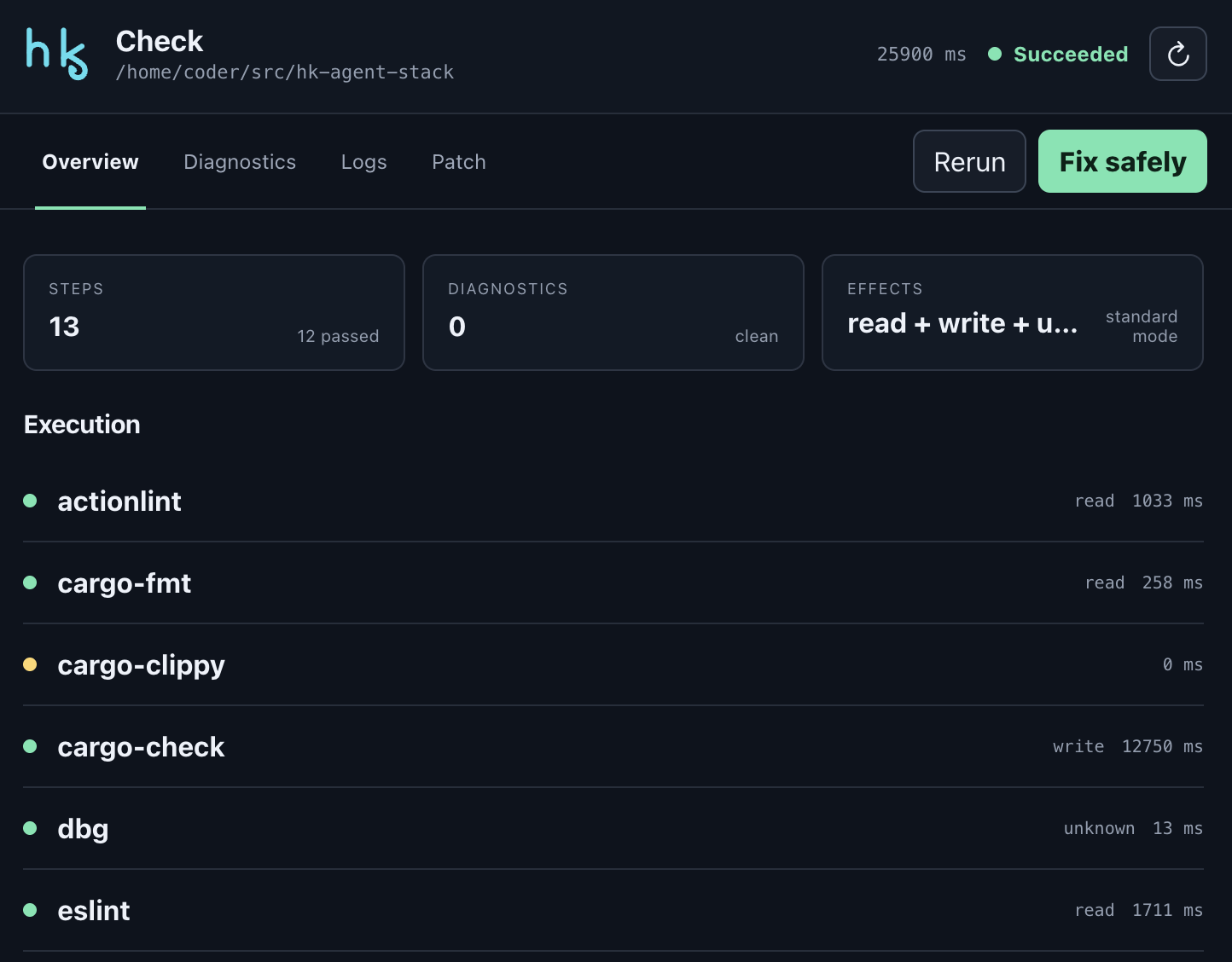
A completed project check in an MCP Apps host, with step timing and command effects.
See the dashboard demo runbook for a deterministic project fixture.
ChatGPT Desktop
ChatGPT Desktop can connect the local STDIO server through OpenAI's Secure MCP Tunnel. Build hk, create the demo fixture, and initialize a local-STDIO tunnel whose MCP command is the absolute hk mcp --root <fixture> command. Run tunnel-client doctor before starting the tunnel, then create a development-mode app in ChatGPT and select the tunnel.
The tunnel is a development bridge. hk itself ships no HTTP listener, hosted service, or authentication system.
Instructions and hooks
Use hk agent instructions for a concise block suitable for AGENTS.md, CLAUDE.md, or a generic agent prompt. Use hk agent hooks for an optional Codex or Claude Code stop hook, or a VS Code task. The Codex and Claude Code snippets run hk agent stop-hook, which reads the Stop hook input from stdin (the first JSON value, waiting at most 5 seconds, so a pipe the agent leaves open cannot stall it), does nothing when stop_hook_active is true, and runs hk run check --safe. In a project without an hk.pkl, or one that defines no check hook, it passes the same way a hook from hk install --global does, so the hook is safe to add to user-level agent settings such as ~/.claude/settings.json. It always exits 0; if the check fails or --safe refuses to run, it prints only {"decision":"block","reason":"..."} so the agent keeps working with a short diagnosis. When the check passes, Claude Code's documented pass is exit 0 with no output, so the Claude Code snippet prints nothing; Codex's documentation is inconsistent about whether empty stdout is accepted, so the Codex snippet passes --target codex and prints {}, which is valid either way. Both agents document this top-level decision/reason JSON for Stop hooks, and Codex rejects any other stdout, so hk's own run_result JSON is never printed from these hooks. A check that runs longer than --timeout seconds (default 100, under Codex's 120-second hook timeout) is stopped, steps included, and reported as a block; the Claude Code snippet passes --timeout 570 beside a hook timeout of 600 seconds, which is Claude Code's default for command hooks. Hook output is deliberately a snippet rather than an automatic installation: inspect its effect on your workflow before enabling it.